
On a StonkBuilder creator link page, “Source reviewed by StonkBuilder” is a narrow attribution label: a human compared the saved destination with separate evidence that supports its connection to a project. It is not a security check, endorsement, investment opinion, or promise that the link will stay current.
The header artwork is conceptual, not a screenshot. This guide describes the implemented workflow reviewed on 2026-09-25; it does not promise a review time or approval.
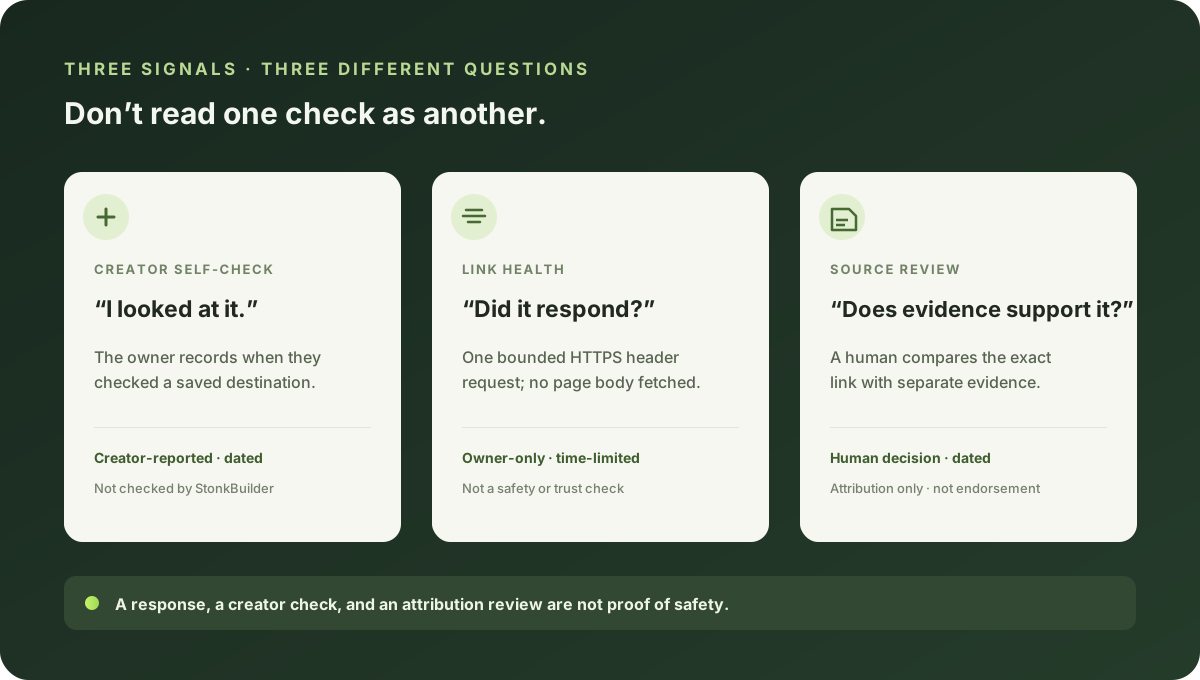
Three checks, three different questions
Creator Studio offers three distinct checks. They are not interchangeable, and none certifies a destination as safe.
Creator self-check: “I looked at this destination”
The community owner can explicitly mark a saved link, video, music, or curated-source destination as checked. StonkBuilder records the time of that action. The public page can show the date and an aged state after 90 days. Changing the URL or card type clears the check, so a new destination is not covered by an older one.
This is the creator’s own check—not a check performed or verified by StonkBuilder.
Link health: “Did this address respond to a limited request?”
An owner can ask for a bounded HTTPS header check of a saved destination. The request does not download the page body. Some sites reject this kind of request, so “unsupported,” “access limited,” and temporary errors are not the same as a dead link. A 404 or 410 needs a second matching observation before it is marked for attention.
A response only describes that limited request at that time. It says nothing about who controls a site, whether its content is accurate, or whether a visitor should trust it. Link-health results are private to the owner.
Independent source review: “Does separate evidence support this attribution?”
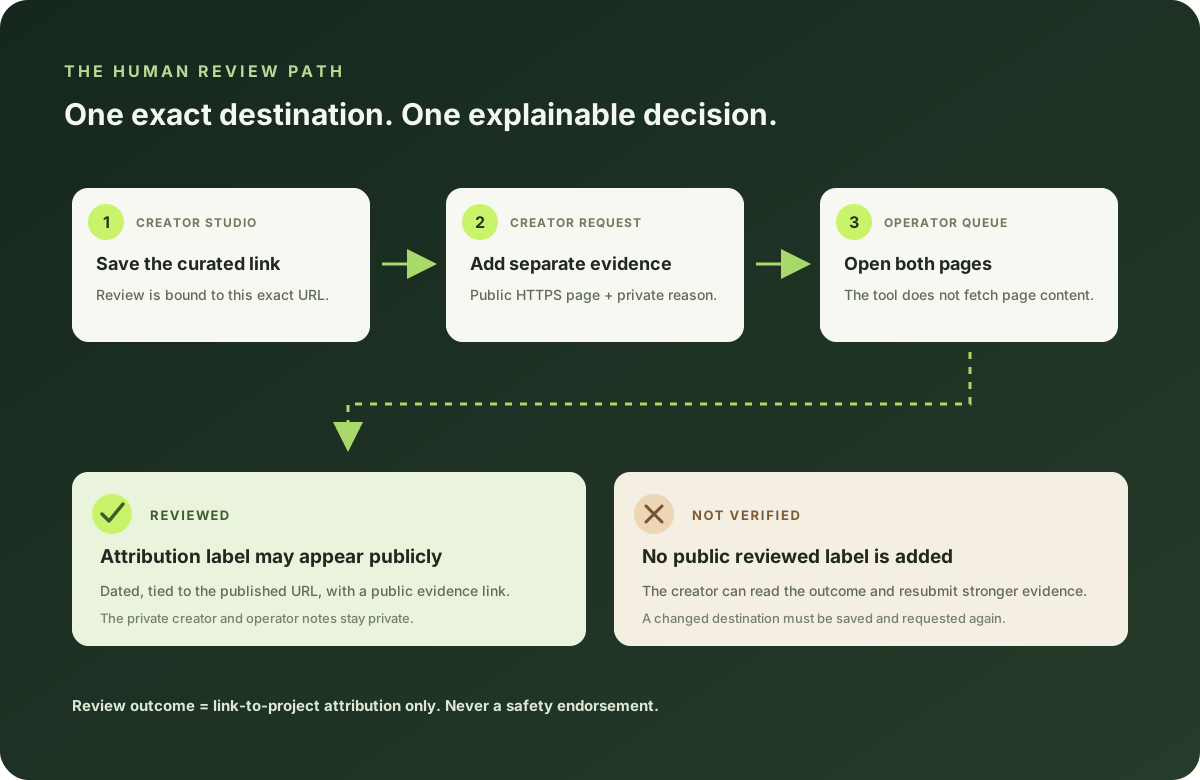
For a Curated source card, the creator can submit the exact saved HTTPS destination, a separate public evidence page, and a private explanation of the relationship to review. An operator opens the pages and records either reviewed or not verified. The review tool does not fetch the submitted pages automatically.
If the evidence supports the link-to-project attribution and the saved destination has not changed, the public card may show a dated source-review label and a link to the independent evidence. The private request note and the operator’s reason are not published. Because the evidence link becomes public when a review is recorded, creators should use a page intended for public viewing—not a private dashboard, invitation, or expiring session link.
“Reviewed” describes this comparison only. It does not mean StonkBuilder tested the destination for malware, audited a token or project, confirmed every creator-supplied detail, or recommends using the link.
Request a review without creating confusion
- In Creator Studio, add or edit a Curated source card and save its destination first.
- Check that the URL is the exact public page you intend visitors to open. Do not submit a draft URL and then switch to a different destination.
- Provide a separate HTTPS page that independently supports the relationship you are asking to have reviewed. A creator-controlled bio repeating the same claim is not independent evidence.
- Explain, in the private request note, what the evidence page establishes about this exact destination. Keep the note factual and concise.
- Wait for a human decision. There is no published turnaround guarantee, and a request does not automatically add a badge.
- If the result is not verified, read the owner-visible reason and resubmit only if you have stronger or more relevant evidence. If the saved URL changes while the request is open, save the new destination and submit a new request.
The reviewer needs to compare the destination that a visitor will actually receive with the separate evidence. This is why approval is tied to the exact saved URL. A changed link cannot inherit an earlier review.
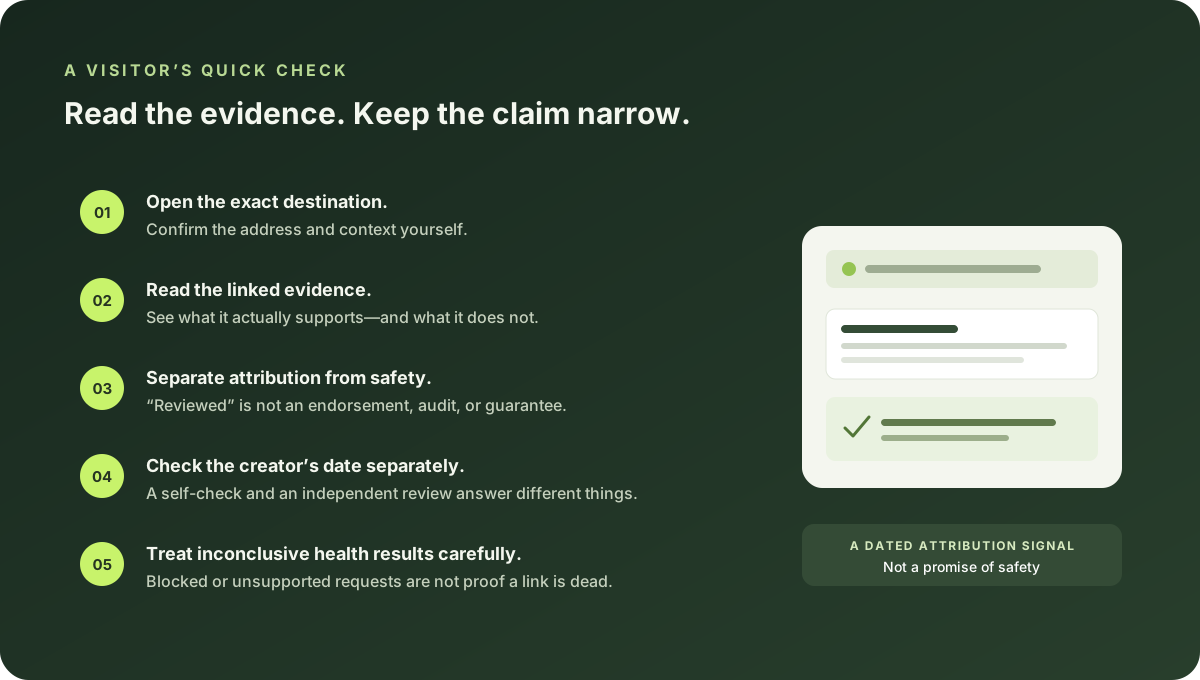
A quick check before you rely on a label
- Open the destination yourself and confirm its address and context.
- Open the linked evidence and see what it actually supports.
- Read the label as attribution evidence, not an endorsement or safety verdict.
- Check whether the creator’s separate self-check is recent; it is a different signal.
- Treat a failed health request cautiously; access controls can produce inconclusive results.
- If anything changed or looks inconsistent, do not rely on an old label—ask the creator or use a trusted source you reached independently.
For the broader practice of organizing project destinations, see how to organize official links for a Solana project. If you are setting up your own community, the StonkBuilder creation walkthrough covers Studio, preview, and publishing; the creator-page launch checklist helps check the finished public page.
Common questions
Does “source reviewed” mean a link is safe?
No. The review is about whether separate evidence supports a link-to-project attribution. It is not a malware scan, security audit, endorsement, or guarantee.
Does StonkBuilder automatically visit the submitted evidence page?
No. The source-review tool does not fetch it. A human operator opens and compares the pages when reviewing a request.
Is the review guaranteed or instant?
No turnaround time or approval is promised. A request remains pending until an operator records an outcome; production review availability depends on an operational reviewer process.
What happens if the destination changes?
A reviewed label applies only to the exact published destination that was checked. A different saved URL cannot use that review; submit the current destination for a new review.
This is product guidance, not financial, security, or investment advice. Interface behavior and review operations may change; check the current page and evidence before acting.