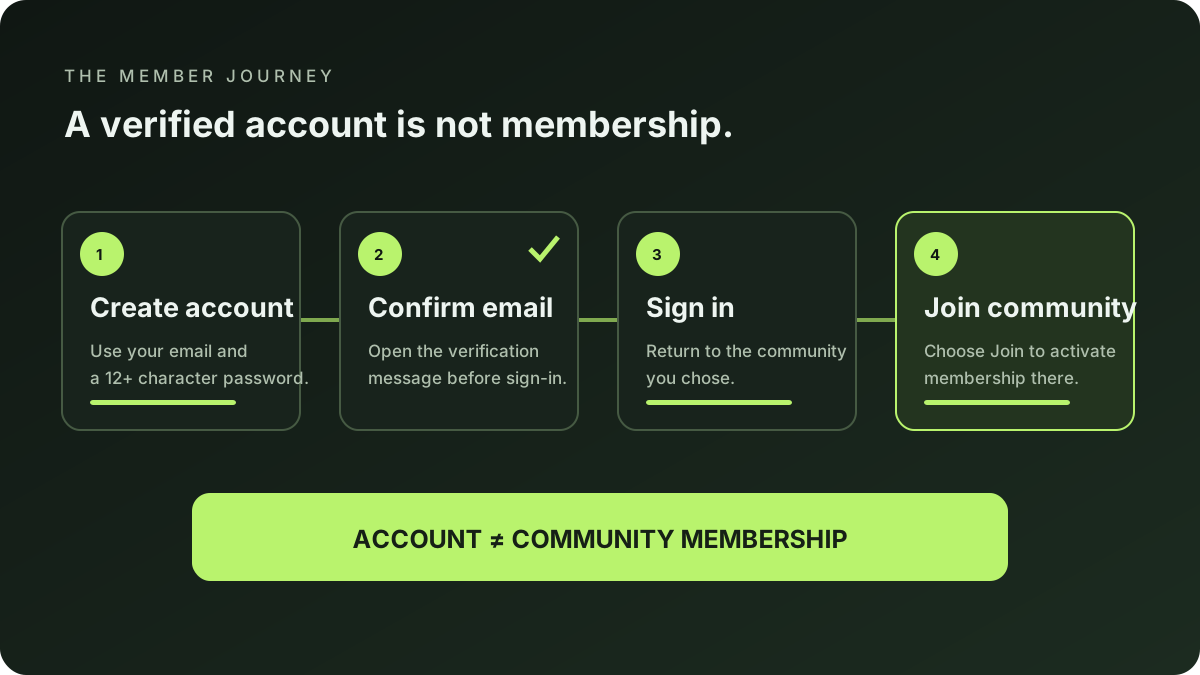
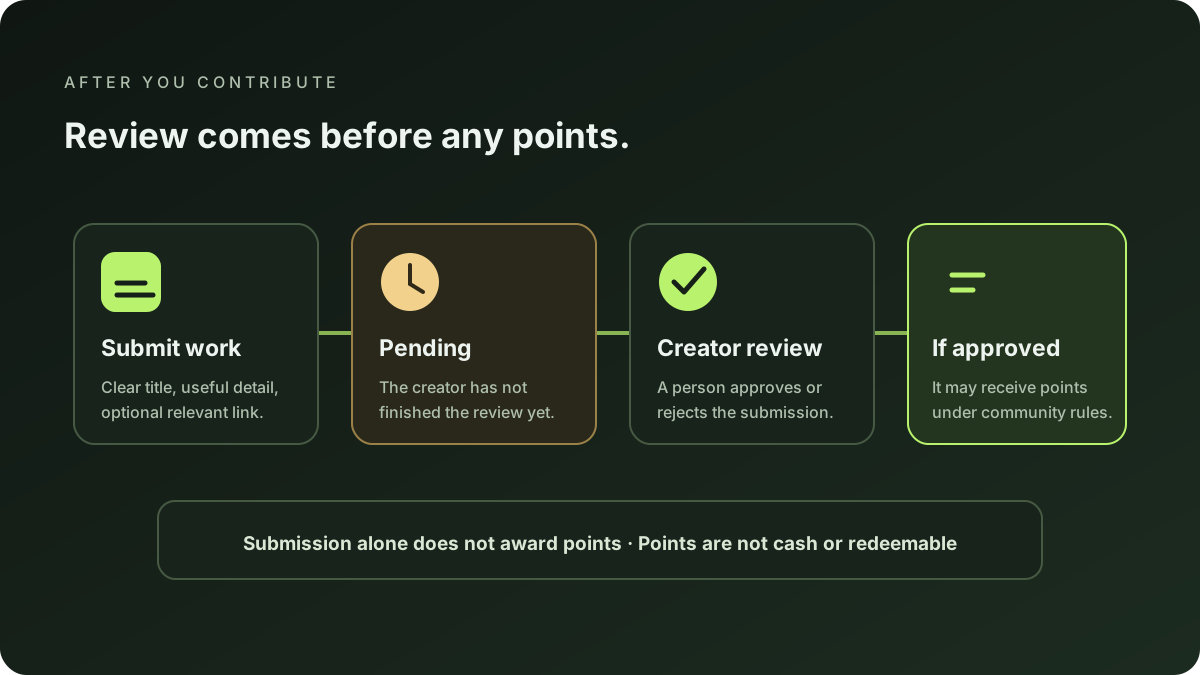
To join a StonkBuilder community, create a member account, confirm your email, sign in, then explicitly join a published community. Creating an account does not make you a member automatically. Once you have joined, you can use that community’s member portal to submit contributions, ask questions, and see available community activity; a creator reviews submissions, and sending work does not award points by itself.
On this page
- Before you start
- Create and verify a member account
- Find and explicitly join a community
- Use the member portal
- Submit work and understand review
- Questions, events, and reports
- Common questions
Before you start
Have access to an email inbox and choose a community whose public page is published. You can start in Discover or follow a community’s public invitation link. Read its description and current instructions before joining; each creator sets the content and expectations for their community.
There are three distinct states to keep straight: an account lets you sign in, membership connects that account to one selected community, and a contribution is a separate submission that the creator reviews. Completing one does not silently complete the next.
Create and verify a member account
- Open member registration. If you arrived from a community’s Join button, keep that community context in the link so registration can return you to the right place.
- Enter your display name, email address, and a password of at least 12 characters. Use an inbox you can access.
- Submit the form and open the verification message. Follow its confirmation link. You must verify the email before signing in.
- Go to member login and sign in. If you started from a community, the return link should keep that community selected.
If the confirmation message does not arrive, check the address and spam folder, then request a fresh registration or verification flow from the site. Do not share your password or email-confirmation link with anyone.
Find and explicitly join a community
After signing in, open the community page you want to participate in. From the member portal, check that the selected community name and handle are correct, then choose Join this community. A successful join changes your membership to active for that community.
Signing in alone does not join you. If the portal says you are not a member yet, use its Join button. If you landed in the wrong community, return to its public page and open that community’s own Join link before continuing.
Use the member portal
Once membership is active, the portal brings your participation tools together:
- Contributions: send a title, description, and optional link for creator review; see the status and any review note shown in your history.
- Community points: see points recorded for activity in this community. Points belong to this community; they are not cash, tokens, redeemable balances, or a promise of payment.
- Questions and answers: ask a question for the creator. Only content the creator publishes or answers is shown publicly in the community’s Q&A area.
- Events and updates: check the public community page for creator-published announcements and event details. Availability depends on what the creator has posted.
- Report a problem: an active member can send a report to the community creator using the portal’s report form.
The exact tools and current content vary by community. Use the member login page to return to your portal.
Submit work and understand review
Write a specific title and a clear description of what you contributed. Add a link only if it helps the creator review the work and is safe to share. Avoid posting passwords, private keys, personal information, or material you do not have permission to submit.
After you submit, the item begins as pending. The creator can approve or reject it and may include a review note. Approval is not automatic, and points are not granted merely because you submitted something. Only approved work may receive community-specific points under that creator’s review and scoring settings. Rejected work receives no points for that submission. Check your contribution history for its displayed status and points.
Questions, events, and reports
Use the question form for a relevant, constructive question about that community. Questions are moderated; do not assume that a submitted question is private or publicly visible until the creator publishes or answers it.
For event dates, participation requirements, or changes, check the community’s own published event and update sections. If something appears broken or inappropriate, use the member portal’s report form. A report is routed to that community’s creator; it is not a public post.
Common questions
I created an account. Why can’t I contribute yet?
Account creation and email verification are only the sign-in steps. You must also sign in and actively join the specific community. Contributions require active membership in that community.
Does submitting a contribution give me points?
No. A submission starts pending and is reviewed by the creator. Only approved work may receive points under that community’s rules; points are not a cash or redeemable reward.
Where can I see whether my work was reviewed?
Sign in, open the same community’s member portal, and look in your contribution history for its status, points if any, and any review note.
Can I join any community?
You can browse public community pages, but membership and available actions are specific to each community. Follow the Join flow on the community you intend to participate in and read its current page details.
Keep learning
For the broader learning path, visit the creator growth guide. If you are a creator setting up your own space, follow the StonkBuilder community creation walkthrough; for general onboarding ideas, see how to welcome new community members. The community leaderboard guide explains how to interpret community points and rankings.
This guide describes the member workflow implemented in StonkBuilder Community as reviewed on 2026-09-24. Interface details and creator policies can change. It does not promise approval, points, payment, or financial results.